The Voxel Part
Definition
The voxel part is the main object [1] used when creating a part. It describes a cuboid part made of voxels and includes various properties and methods that can be used to describe and manipulate a part.
A VoxelPart object has a number of different properties (variables), some of which are specified when it is created. Some of these properties are as follows:
name: Name of the voxel part.
description: A short description of the part.
data: See the next section.
size: Size of the part’s data property in the three directions.
voxel_size: The size of a voxel in the three directions.
real_size: Real size of a part. Calculated based on the above properties.
For a complete list, refer to the documentation
for the VoxelPart class.
The Underlying Data Structure
The main property (variable) in the VoxelPart class is named data. It is a 2D or 3D numpy array which describes a square or cuboid grid of elements. This means that all elements are rectangular or cuboid in shape, i.e. they are pixels or voxels. Use of NumPy allows us to utilize the package’s extremely optimized numerical facilities and provides compatibility with other useful mathematical libraries.
Materials
Each cell in the data array is considered a voxel. The value of a cell determines the material assigned to that cell. As such, it must be a non-negative integer and by convention, a value of zero signifies empty space. This approach means that the model can have as many different materials as possible within the biggest data type of NumPy’s array. Each of these is called a Material Code. While this may give the user freedom in using as many materials as possible, this raises the problem that an array must have the same data type for all of its elements which can consume a lot of memory.
Practically speaking, most models will not have many elements. Therefore, when creating the voxel part the dtype parameter can be set to specify the data type of the data array. Users are advised to use the smallest data type necessary needs to make computations faster and less memory intensive. Table 1 shows valid dtype values and their respective ranges and memory consumption.
dtype Value |
Material Code Range |
NumPy Equivalent |
Required Memory |
|
|---|---|---|---|---|
One Element |
125M Elements |
|||
‘uint8’ |
0 – 255 |
numpy.uint8 |
1 Byte |
125 MB |
‘uint16’ |
0 – 65535 |
numpy.uint16 |
2 Bytes |
250 MB |
‘uint32’ |
0 – 2 32-1 |
numpy.uint32 |
4 Bytes |
500 MB |
‘uint64’ |
0 – 2 64-1 |
numpy.uint64 |
8 Bytes |
1000 MB |
When outputting the model, the materials to be output will be selected and only those materials will be written to the output file (which is currently an Abaqus™ .inp file). For each material code, an Abaqus element set is created which can be used for assigning materials properties. Any material code not requested for output will have its element not written to the output. This is typically elements with a material code of zero, but can be any material code that the user desires. A sample transformation between the data array and finite element mesh is shown in Fig. 8.
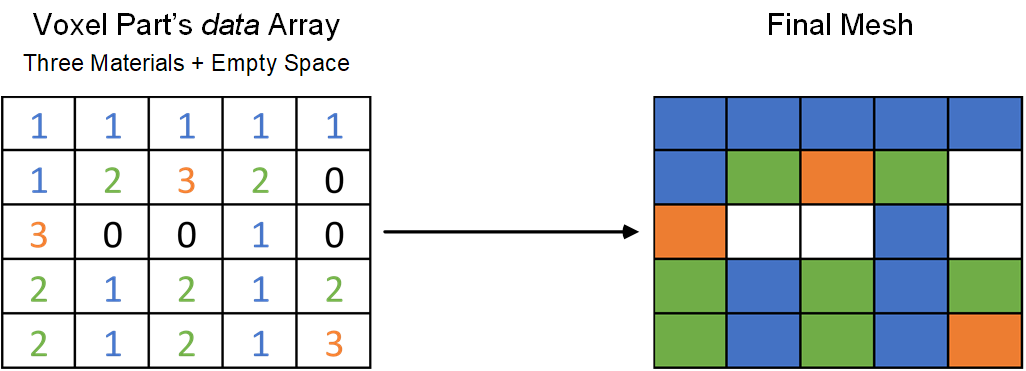
Fig. 8 The data variable for a 5×5 model containing three different materials and empty space and the resulting mesh. White cells signify empty space.
Changing the materials in a model is the backbone of all model manipulations. This is discussed in detail in Modeling Techniques