Example A-3: Manual Manipulation of the Structure (Single Elements)
This example illustrated manual modification of the data array of a VoxelPart instance. Unlike Example A-4, here we manipulate the elements one by one.
First, a complete 2D part with a shape of 5×5 voxels is created with a base material of 1 and a voxel size of 0.02 units in all directions. The parameter log_debug is set to True for demonstration purposes.
Afterwards, the value of elements in positions (1,5) and (3,2) of the data array is set to 2, which will be output as MAT-2.
Then, the value of the element in position (4,3) is set to 0, which signifies empty space.
Finally, The part is exported to an Abaqus™ input file in 2D mode with CPE4R elements. The Non-Empty elements (which happens to be MAT-1 and MAT-2), are requested to be exported.
The code can be found in the examples folder of the main repository. It is also included below:
"""Script for Example A-3: Manual Manipulation of the Structure (Single Elements)."""

from vcams.voxelpart import VoxelPart

# Create the part.
part = VoxelPart(size=(5, 5), base_material=1, voxel_size=(0.02, 0.02), name='Ex A3 Manual Manipulation Single',
                 description='Example A-3: A 5*5 2D part filled with elements with two elements changed manually.',
                 log_debug=True)

# Manually change some elements. Note that NumPy uses zero-based indexing.
# Change the value of elements in positions (1,5) and (3,2) to MAT-2.
part.data[0, 4] = 2
part.data[2, 1] = 2

# Change the value of the element in position (4,3) to MAT-0 which is empty space.
part.data[3, 2] = 0

# Output the part.
part.output_abaqus_inp(file_name='ex_a3_manual_manipulation_single',
                       elem_code='CPE4R', dim='2D',
                       material_elem_sets='Non-Empty')
The final model looks like Fig. 11. Note that elements in different sets are shown in different colors.
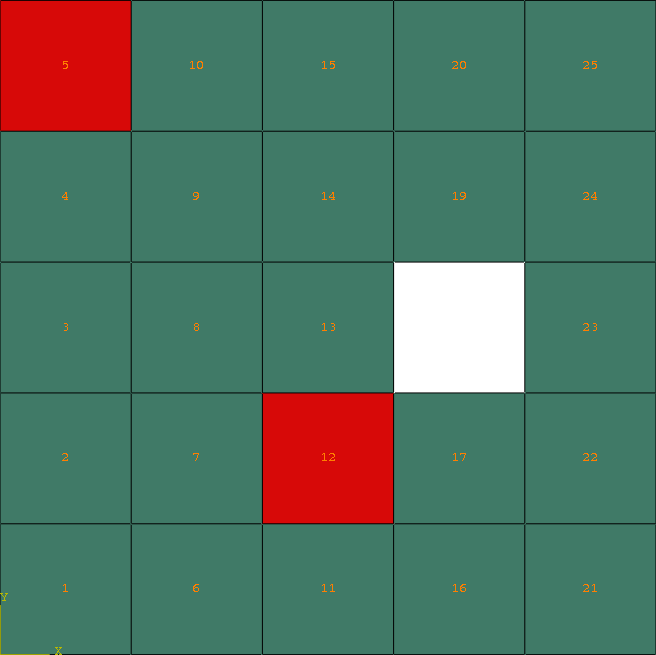
Fig. 11 Final model of Example A-3. Element sets corresponding to MAT-1 and MAT-2 are shown in green and red, respectively.