Example A-5: Random 3D Model
This example, a 3D part is created with random dispersion of three materials. This can be achieved by combining Example A-2 and Example A-4.
These kinds of models are very useful. For example, this paper [1] uses a variant of this model with two materials for and a specific ratio of the two phases for simulating the microstructure of a dual-phase steel in the RVE framework.
First, a complete 3D part with a shape of 50×75×100 voxels is created with a base material of 1 and a voxel size of 0.02 units in all directions. The parameter log_debug is set to True for demonstration purposes.
Afterwards, the an array of random integers between 1 and 3 is created. To do this, the random module of NumPy must be imported:
from numpy import random
The random number generator can then be constructed:
rng = random.default_rng()
With the random number generator prepared, we can create an array of random numbers. We must specify the size, highest and lowest numbers, and the dtype of the random array. These can be extracted from the part’s data array. We will then assign the created array to part.data, thus replacing its previous contents:
random_array = rng.integers(low=1, high=3, size=part.size,
                         dtype=part.data.dtype, endpoint=True)
part.data = random_array
Finally, The part is exported to an Abaqus™ input file in 3D mode with C3D8R elements. The Non-Empty elements are requested to be exported.
The code can be found in the examples folder of the main repository. It is also included below:
"""Script for Example A-5: Random 3D Model."""

from numpy import random
from vcams.voxelpart import VoxelPart

# Create the part.
part = VoxelPart(size=(50, 75, 100), base_material=1, voxel_size=(0.02, 0.02, 0.02), name='Ex A5 Random 3D Part',
                 description='Example A-5: A 50*75*100 3D part filled with random elements.', log_debug=True)

# Prepare the random number generator.
rng = random.default_rng()
# Create an array of random integers with the same size and dtype as part.data
# and set the min and max values to 1 and 3, respectively.
random_array = rng.integers(low=1, high=3, size=part.size,
                            dtype=part.data.dtype, endpoint=True)
# Assign random_array to part.data, which replaces its contents.
part.data = random_array

# Output the part.
part.output_abaqus_inp(file_name='ex_a5_random_3d_part',
                       elem_code='C3D8R', dim='3D',
                       material_elem_sets='Non-Empty')
The final model looks like Fig. 13. Note that elements in different sets are shown in different colors. Also, because of the random nature of this example, each model will be different.
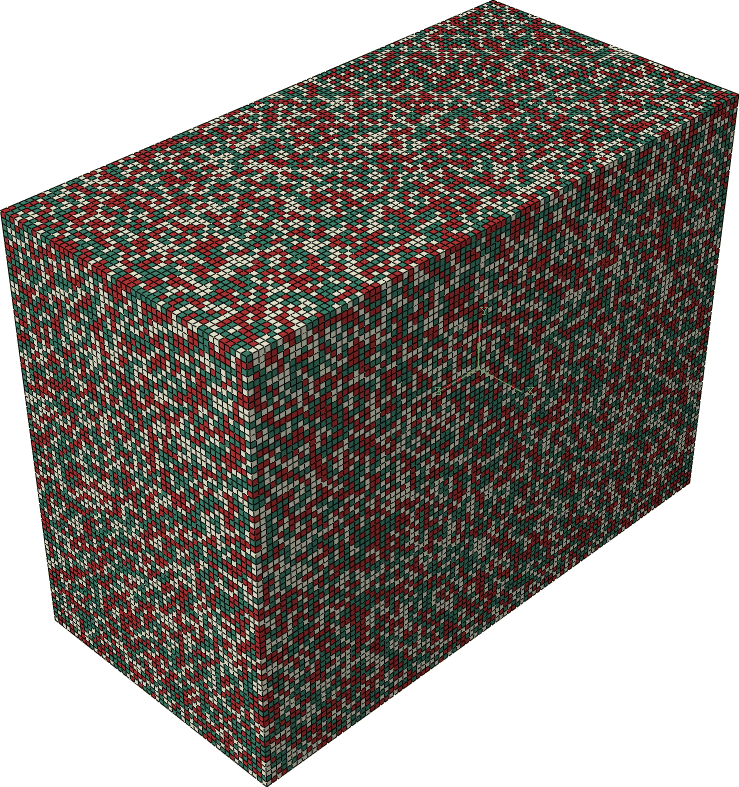
Fig. 13 Final model of Example A-5. Element sets corresponding to MAT-1, MAT-2 and MAT-3 are shown in green, beige, and red, respectively.