Example C-1: Custom Mask Function (2D)
This example shows how to use a custom function to create a Boolean mask and then use that mask to manipulate the part. This example deals with a 2D part. For a 3D example, refer to Example C-2.
First, a 2D part with a shape of 50×50 voxels is created with a base material of 1 and a voxel size of 0.02 units in all directions. The parameter log_debug is set to True for demonstration purposes.
Afterwards, the circle_func function is created which describes a circle.
This function accepts x, y, z and then the rest of the parameters.
It should be noted that it must always accept z, even if it is not used
in the calculations:
def circle_func(x, y, z, a, b, r):
    return (x - a) ** 2 + (y - b) ** 2 - r ** 2
Then, a mask is created using the circle_func function.
There are three parameters that need to be passed which are
all set to half of the real model size:
t = part.real_size[0] / 2
circle_mask = mask.function.mask_from_function(part=part, func=circle_func,
                                               a=t, b=t, r=t)
Afterwards, the Boolean mask is applied to the part with a value of 2. This means that the values of the elements selected by the mask are set to 2:
part.apply_mask(mask=circle_mask, value=2)
Finally, The part is then exported to an Abaqus™ input file in 2D mode with CPE4R elements. The Non-Empty elements (which happens to be the whole model), are requested to be exported.
The code can be found in the examples folder of the main repository. It is also included below:
"""Script for Example C-1: Custom Mask Function (2D)."""

from vcams import mask
from vcams.voxelpart import VoxelPart

# Create the part.
part = VoxelPart(size=(50, 50), base_material=1, voxel_size=(0.02, 0.02), name='Ex C-1 Custom Mask Function 2D',
                 description='A 2D square 50*50 part created using a custom mask function.', log_debug=True)


# Define the function of a circle so a Boolean mask can be created from it.
# Note that the function accepts x, y, z and then the rest of the parameters.
# The function must always accept z, even if it is not used.
def circle_func(x, y, z, a, b, r):
    return (x - a) ** 2 + (y - b) ** 2 - r ** 2


# Create a Boolean mask based on the VoxelPart object.
t = part.real_size[0] / 2
circle_mask = mask.function.mask_from_function(part=part, func=circle_func,
                                               a=t, b=t, r=t)

# Apply the Boolean mask to the part.
part.apply_mask(mask=circle_mask, value=2)

# Output the part.
part.output_abaqus_inp(file_name='ex_c1_custom_function_2d',
                       elem_code='CPE4R', dim='2D',
                       material_elem_sets='Non-Empty')
The final model looks like Fig. 16. Note that elements in different sets are shown in different colors.
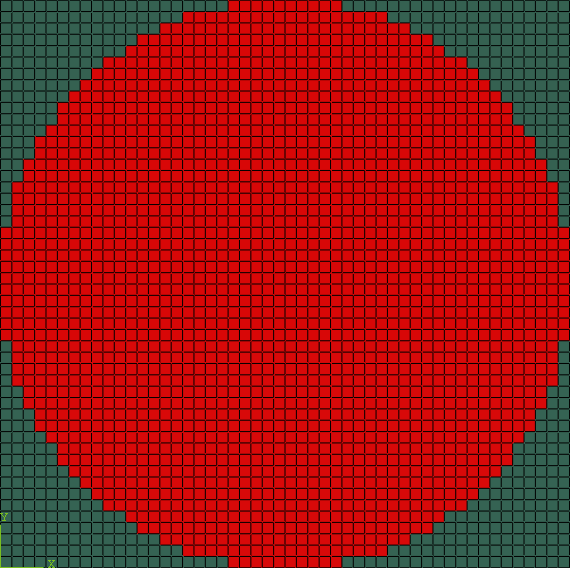
Fig. 16 Final model of Example C-1. Element sets corresponding to MAT-1 and MAT-2 are shown in green and red, respectively.