Example C-5: Part from Image (2D)
In this example, a 2D part is created based on an image.
Two methods are presented, with the first using
the mask_from_image() function
which binarizes the image using the default Otsu’s Threshold
and returns a Boolean mask, which is then applied to the part.
The second method uses
the voxelpart_from_image() function
that does all of this automatically.
This procedure is especially useful for grayscale images obtained from microscopy. See Image-Based Structures for more information and some important tips. In order to avoid copyright issues, a simple image of a dual-phase steel is taken from Wikipedia (licensed under CC BY-SA 4.0) and is used for this example.

The First Method
First, the image is converted to a mask without being re-scaled:
image_mask = mask_from_image(image_path='ex_c5_image_2d_input.jpg',
                             scale=1.0, denoise=True)
Then the image is rotated -90 degrees to account for the difference between the XY directions in Abaqus and the picture:
image_mask = rot90(image_mask, -1)
Afterwards, a 2D part with the same shape as the mask is created with a base material of 1 and a voxel size of 0.02 units in all directions. The parameter log_debug is set to True for demonstration purposes.
The mask is then applied to the part with a value of 2. And finally, the part is then exported to an Abaqus™ input file in 2D mode with CPE4R elements. The Non-Empty elements are requested to be exported.
The code can be found in the examples folder of the main repository. It is also included below:
"""First Script for Example C-5: Part from Image (2D)."""

from numpy import rot90

from vcams.mask.image import mask_from_image
from vcams.voxelpart import VoxelPart

# Create a Boolean mask based on an image.
# The image is taken from https://en.wikipedia.org/wiki/File:Dual_Phase_Steel.jpg
# and is under the CC BY-SA 4.0 license.
image_mask = mask_from_image(image_path='ex_c5_image_2d_input.jpg',
                             scale=1.0, denoise=True)

# Create the part based on the size of image_mask.
part = VoxelPart(size=image_mask.shape, base_material=1, voxel_size=(0.02, 0.02), name='Ex C-5 Part from Image 2D - A',
                 description='A 2D part created based on a 2D image.', log_debug=True)

# Apply the Boolean mask to the part.
# The elements selected by the mask will be set to 2,
# while the rest will be 1.
part.apply_mask(mask=image_mask, value=2)

# Output the part.
part.output_abaqus_inp(file_name='ex_c5_image_2d_a',
                       elem_code='CPE4R', dim='2D',
                       material_elem_sets='Non-Empty')
The Second Method
This method uses the voxelpart_from_image() function
which automatically does all of the steps used in the first method.
it is more convenient, but allows for less customization.
"""Second Script for Example C-5: Part from Image (2D)."""

from vcams.voxelpart import voxelpart_from_image

# Create a Boolean mask based on an image.
# The image is taken from https://en.wikipedia.org/wiki/File:Dual_Phase_Steel.jpg
# and is under the CC BY-SA 4.0 license.
part = voxelpart_from_image(image_dim='2D',
                            image_path='ex_c5_image_2d_input.jpg',
                            scale=1.0, denoise=True,
                            background_material=1, foreground_material=2,
                            voxel_size=(0.02, 0.02),
                            name='Ex C-6 Part from Image 2D - B',
                            description='A 2D part created based on a 2D image.',
                            log_debug=True)

# Output the part.
part.output_abaqus_inp(file_name='ex_c5_image_2d_b',
                       elem_code='CPE4R', dim='2D',
                       material_elem_sets='Non-Empty')
Results
The initial image and the final model are shown in Fig. 20.
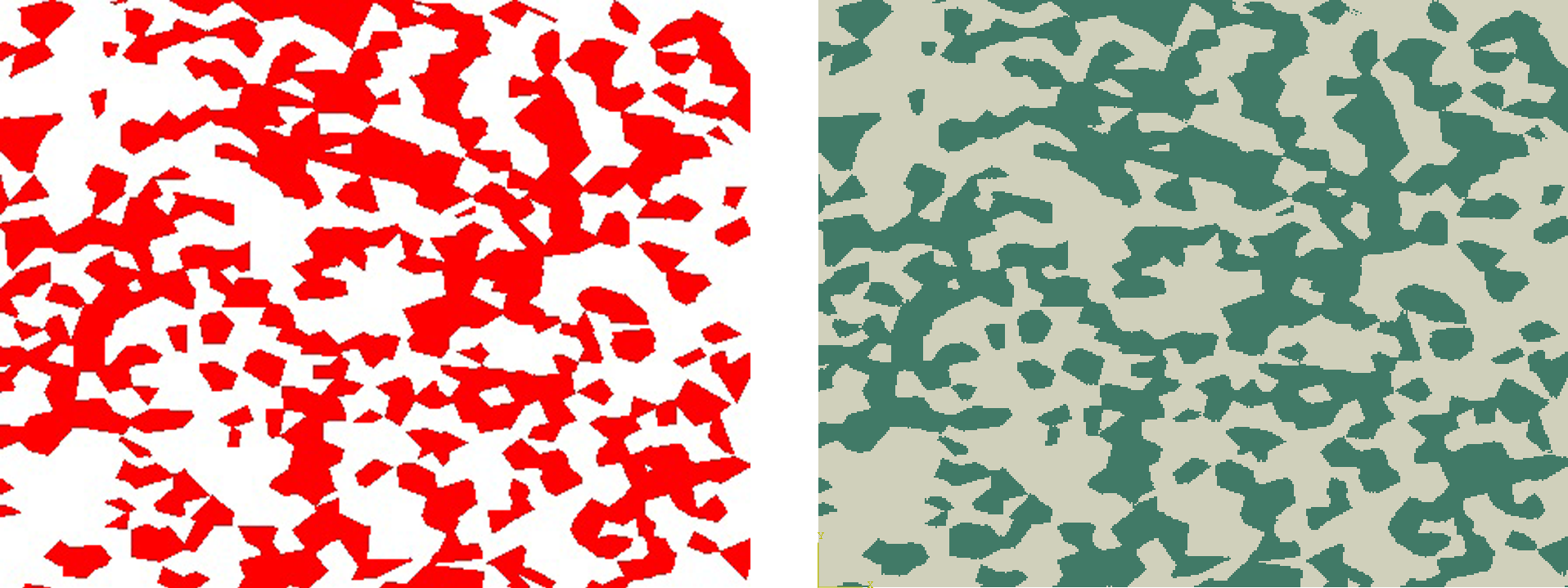
Fig. 20 Initial image (left) and final model (right) for Example C-5.