Example C-9: Shape Array
This example demonstrates the use of the ShapeArray class
for creating a Boolean mask which is then used to manipulate the part.
A ShapeArray instance contains
a number of shapes which can be of different classes,
but must all be subclasses of the BaseShape class
and be of the same dimensionality (2D/3D).
Here, a 2D ShapeArray is defined based on the VoxelPart instance and then a number of shapes are added to it. Finally, the ShapeArray instance’s mask property is used for manipulating the part. Compared to examples C-1, C-2, and C-8, this method is extremely straightforward and allows for a variety of scripting techniques to be used.
First, a 2D part with a shape of 50×50 voxels is created with a base material of 1 and a voxel size of 0.02 units in all directions. The parameter log_debug is set to True for demonstration purposes.
Afterwards, an instance of the ShapeArray class
is created based on the VoxelPart and with its dimensionality set to 2D:
shape_array_obj = ShapeArray(dim='2D', part=part)
Then, a number of shapes are added using
the add_shape() method.
Each time, one of the classes in the shape module is passed
which determines the shape to be added. Also, the shape’s parameters are added
as keyword arguments:
shape_array_obj.add_shape(Circle, xc=0, yc=0, r=0.1)
shape_array_obj.add_shape(Circle, xc=0.4, yc=0.2, r=0.15)
shape_array_obj.add_shape(Circle, xc=0.7, yc=0.5, r=0.1)
shape_array_obj.add_shape(Ellipse, a=0.15, b=0.30, xc=0.30, yc=0.65, alpha=30)
When using the ShapeArray class we don’t need to calculate a mask,
we just ask it to give us its mask using
the mask property
which will always be up-to-date.
This Boolean mask is applied to the part with a value of 2.
This means that the values of the elements selected by the mask are set to 2:
part.apply_mask(mask=shape_array_obj.mask, value=2)
Finally, The part is exported to an Abaqus™ input file in 2D mode with CPE4R elements. The Non-Empty elements (which happens to be the whole model), are requested to be exported.
The code can be found in the examples folder of the main repository. It is also included below:
"""Script for Example C-9: Shape Array"""

from vcams.mask.shape import ShapeArray, Circle, Ellipse
from vcams.voxelpart import VoxelPart

# Create the part.
part = VoxelPart(size=(50, 50), base_material=1, voxel_size=(0.02, 0.02), name='Ex C-9 Shape Array',
                 description='A 2D square 50*50 part containing an array of different shapes.', log_debug=True)

# Create a ShapeArray based on the VoxelPart object.
shape_array_obj = ShapeArray(dim='2D', part=part, wrap_mask=True)

# Add shapes to shape_disp_array_obj.
# Note that the class object is passed as the first argument.
shape_array_obj.add_shape(Circle, xc=0, yc=0, r=0.1)
shape_array_obj.add_shape(Circle, xc=0.4, yc=0.2, r=0.15)
shape_array_obj.add_shape(Circle, xc=0.7, yc=0.5, r=0.1)
shape_array_obj.add_shape(Ellipse, a=0.15, b=0.30, xc=0.30, yc=0.65, alpha=30)

# Apply the Boolean mask to the part.
part.apply_mask(mask=shape_array_obj.mask, value=2)

# Output the part.
part.output_abaqus_inp(file_name='ex_c9_shape_array',
                       elem_code='CPE4R', dim='2D',
                       material_elem_sets='Non-Empty')
The final model looks like Fig. 24. Note that elements in different sets are shown in different colors.
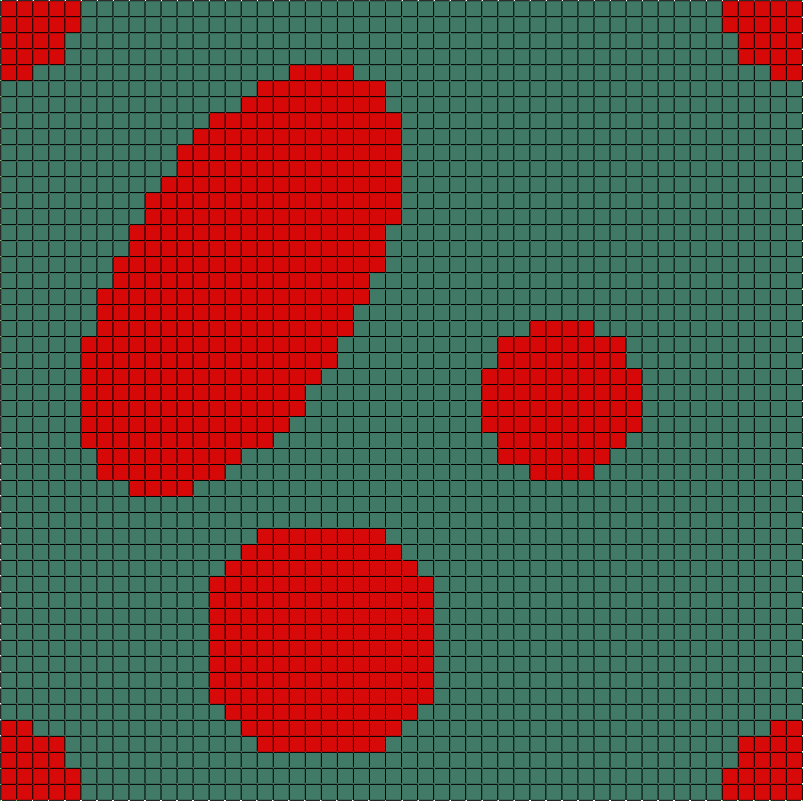
Fig. 24 Final model of Example C-9. Element sets corresponding to MAT-1 and MAT-2 are shown in green and red, respectively.