Example C-2: Custom Mask Function (3D)
This example shows how to use a custom function to create a Boolean mask and then use that mask to manipulate the part. This example deals with a 3D part. For a 2D example, refer to Example C-1.
In this example, a 3D part with a shape of 50×50×50 voxels is created with a base material of 1 and a voxel size of 0.02 units in all directions. The parameter log_debug is set to True for demonstration purposes.
Afterwards, the sphere_func function is created which describes a circle.
This function accepts x, y, z and then the rest of the parameters.
It should be noted that it must always accept z, even if it is not used
in the calculations:
def sphere_func(x, y, z, a, b, c, r):
    return (x - a) ** 2 + (y - b) ** 2 + (z - c) ** 2 - r ** 2
Then, a mask is created using the sphere_func function.
There are four parameters that need to be passed which are
all set to half of the real model size:
t = part.real_size[0] / 2
sphere_mask = mask.function.mask_from_function(part=part, func=sphere_func,
                                               a=t, b=t, c=t, r=t)
Afterwards, the Boolean mask is applied to the part with a value of 0. This means that the values of the elements selected by the mask are set to 0, which signifies empty space:
part.apply_mask(mask=circle_mask, value=2)
Finally, the part is then exported to an Abaqus™ input file in 3D mode with C3D8R elements. The Non-Empty elements are requested to be exported.
The code can be found in the examples folder of the main repository. It is also included below:
"""Script for Example C-2: Custom Mask Function (3D)."""

from vcams import mask
from vcams.voxelpart import VoxelPart

# Create the part.
part = VoxelPart(size=(50, 50, 50), base_material=1, voxel_size=(0.02, 0.02, 0.02),
                 name='Ex C-2 Custom Mask Function 3D',
                 description='A 3D cubic 50*50*50 part created using a custom mask function.', log_debug=True)


# Define the function of a sphere so a Boolean mask can be created from it.
# Note that the function accepts x, y, z and then the rest of the parameters.
# The function must always accept z, even if it is not used.
def sphere_func(x, y, z, a, b, c, r):
    return (x - a) ** 2 + (y - b) ** 2 + (z - c) ** 2 - r ** 2


# Create a Boolean mask based on the VoxelPart object.
t = part.real_size[0] / 2
sphere_mask = mask.function.mask_from_function(part=part, func=sphere_func,
                                               a=t, b=t, c=t, r=t)

# Apply the Boolean mask to the part.
part.apply_mask(mask=sphere_mask, value=0)

# Output the part.
part.output_abaqus_inp(file_name='ex_c2_custom_function_3d',
                       elem_code='C3D8R', dim='3D',
                       material_elem_sets='Non-Empty')
The final model looks like Fig. 17. Note the empty space in the shape of a sphere. Also, the stepping visible in the part is due to the low resolution of the model. A bigger model will result in a better shape.
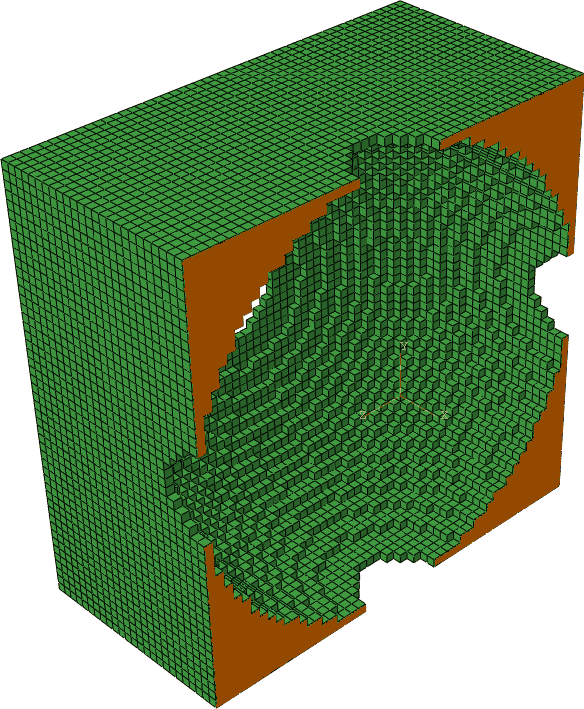
Fig. 17 A cross section of the final model of Example C-2. Note the empty space in the shape of a sphere.