Example C-3: Randomly Distributed Second Phase (2D)
This example, a 2D part is created in which a second phase is randomly distributed in a background. This is similar to Example A-5, but is achieved more easily using a Boolean Mask. Also, a 3D version is demonstrated in Example C-4.
These kinds of models are very useful. For example, this paper [1] uses a variant of this model with two materials for and a specific ratio of the two phases for simulating the microstructure of a dual-phase steel in the RVE framework.
First, a 2D part with a shape of 100×100 voxels is created with a base material of 1 and a voxel size of 0.02 units in all directions. The parameter log_debug is set to True for demonstration purposes.
Then, the random_binary_mask() function is used
to create a Boolean mask based on the part instance.
The true_fraction parameter is set to 0.42, meaning that 42% of the elements will
be randomly selected by the mask:
random_mask = random_binary_mask(part=part, true_fraction=0.42)
Afterwards, the Boolean mask is applied to the part with a value of 2. This means that the values of the elements selected by the mask are set to 2:
part.apply_mask(mask=random_mask, value=2)
Finally, The part is then exported to an Abaqus™ input file in 2D mode with CPE4R elements. The Non-Empty elements (which happens to be the whole model), are requested to be exported.
The code can be found in the examples folder of the main repository. It is also included below:
"""Script for Example C-3: Randomly Distributed Second Phase (2D)"""

from vcams.mask.random import random_binary_mask
from vcams.voxelpart import VoxelPart

# Create the part.
part = VoxelPart(size=(100, 100), base_material=1, voxel_size=(0.02, 0.02), name='Ex C-3 Random Mask 2D Part',
                 description='Example C-3: A two-phase 100*100 part with a random distribution of elements.',
                 log_debug=True)

# Create a Boolean mask based on a random distribution of elements.
random_mask = random_binary_mask(part=part, true_fraction=0.42)

# Apply the Boolean mask to the part as material 2.
part.apply_mask(mask=random_mask, value=2)

# Output the part.
part.output_abaqus_inp(file_name='ex_c3_random_mask_2d',
                       elem_code='CPE4R', dim='2D',
                       material_elem_sets='Non-Empty')
The final model looks like Fig. 18. Note that elements in different sets are shown in different colors.
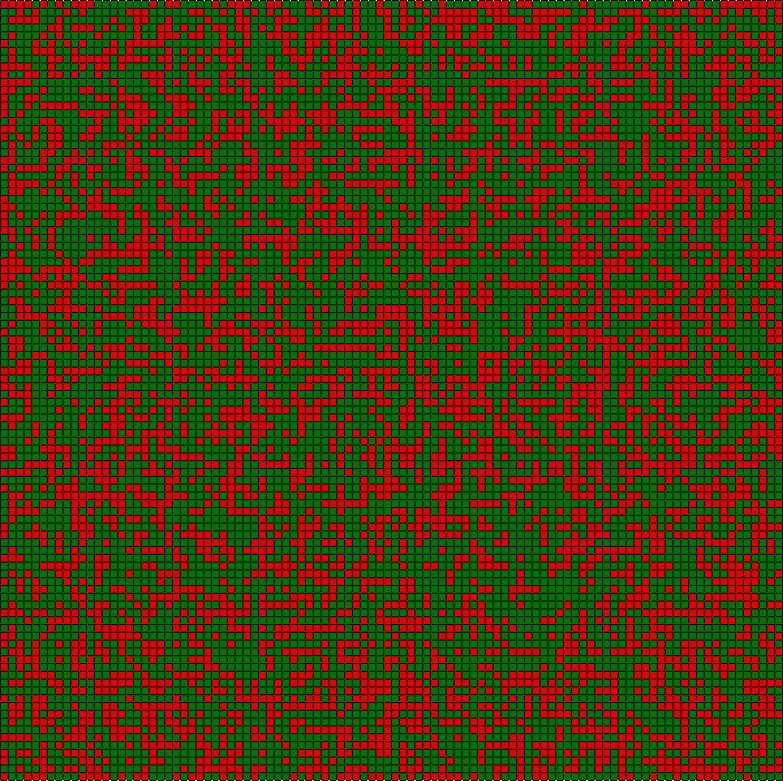
Fig. 18 Final model of Example C-3. Element sets corresponding to MAT-1 and MAT-2 are shown in green and red, respectively.